This post is about how to use Youtube's data api to search youtube videos in android. Unlike all the other youtube api's like Player api there is not an android client to leverage those api's into the app.
But there is a Java client provided access to data api which we can use to search videos in our case.
Following post will allow you to make you better use of the Java client to get the required result.
Since in this post we will be presenting to you how to search youtube videos by keywords but using the java client to search videos gets a little confusing as Java client contains a number of jars required for various functionalities ranging from posting a channel bulletin, uploading a video, updating an video, searching videos etc.
A lot of other dependencies (Google OAuth client etc.) are also added in the client library which simply of no use in a case like current where we only want to search videos for a particular keyword.
Assumptions :
1. Registered your application in Google API console to be able to use Google Services like Youtube Data API etc.
Please follow the link
https://developers.google.com/youtube/v3/getting-started#before-you-start
2. Create a browser key under your project's OAuth and Credentials menu.
The API supports two types of credentials. Create whichever credentials are appropriate for your project:
-> OAUTH
-> API KEY
Since we are presenting a demo for the videos search, so we won't need any user level authentication hence avoiding OAUTH, instead we will be using API KEY to authenticate app to use Youtube data api.
YOUTUBE Data Api :
Best part of the youtube data api is that it provides an efficient way to fetch the partial resources with employed filtering of unneeded data. Hence makes better use of network, CPU and memory resources.
The filtering as cited in the above sentence is implemented by using two parameters to each request we make to fetch the youtube reosurce. It simply means that a particular youtube resource which is completely defined by a large number of properties can be filtered down based upon the properties required by a user.
1. part : this parameter ensures that a required group of properties is returned by the user. It is the one of the important top-level non-nested properties that should be added into the api response . For example : snippet, contentDetails, statistics etc.
2. fields : this filters the API response to return only specific properties within the requested resource parts.
example for representing filtering of nested properties is as follows :
-> fields=items/id,playlistItems/snippet/title,playlistItems/snippet/position {identify a nested property}
-> fields=items(id,snippet/title,snippet/position)
-> fields=items(id,snippet(title,position)) {group of nested properties }
NOTE : Alternative for accessing Youtube data is to fetch the data using REST API url with defined parameters
https://www.googleapis.com/youtube/v3/videos?id=7lCDEYXw3mM&key=YOUR_API_KEY&fields=items(id,snippet(channelId,title,categoryId),statistics)&part=snippet,statistics
Gradle dependencies required are :
Issue :
We will create a browser key instead of android key with allowed HTTP referrers field set empty. With Android key it was giving service config errors (Error code : 403)
References :
https://developers.google.com/youtube/v3/getting-started
https://developers.google.com/youtube/v3/code_samples/java#search_by_keyword
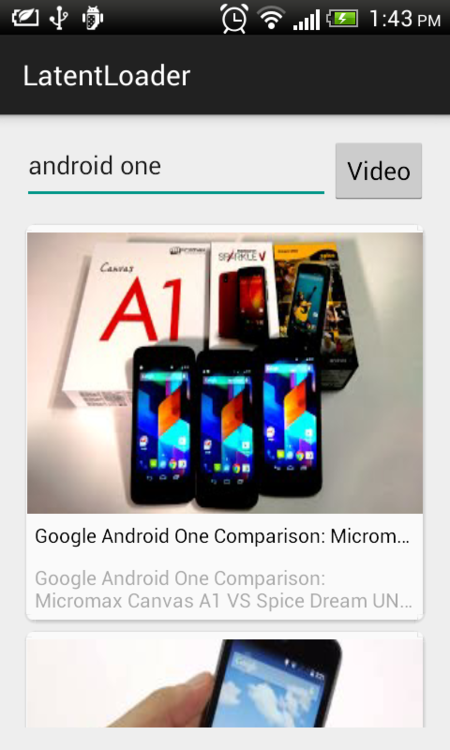
Please find Source Code here.
But there is a Java client provided access to data api which we can use to search videos in our case.
Following post will allow you to make you better use of the Java client to get the required result.
Since in this post we will be presenting to you how to search youtube videos by keywords but using the java client to search videos gets a little confusing as Java client contains a number of jars required for various functionalities ranging from posting a channel bulletin, uploading a video, updating an video, searching videos etc.
A lot of other dependencies (Google OAuth client etc.) are also added in the client library which simply of no use in a case like current where we only want to search videos for a particular keyword.
Assumptions :
1. Registered your application in Google API console to be able to use Google Services like Youtube Data API etc.
Please follow the link
https://developers.google.com/youtube/v3/getting-started#before-you-start
2. Create a browser key under your project's OAuth and Credentials menu.
The API supports two types of credentials. Create whichever credentials are appropriate for your project:
-> OAUTH
-> API KEY
Since we are presenting a demo for the videos search, so we won't need any user level authentication hence avoiding OAUTH, instead we will be using API KEY to authenticate app to use Youtube data api.
YOUTUBE Data Api :
Best part of the youtube data api is that it provides an efficient way to fetch the partial resources with employed filtering of unneeded data. Hence makes better use of network, CPU and memory resources.
The filtering as cited in the above sentence is implemented by using two parameters to each request we make to fetch the youtube reosurce. It simply means that a particular youtube resource which is completely defined by a large number of properties can be filtered down based upon the properties required by a user.
1. part : this parameter ensures that a required group of properties is returned by the user. It is the one of the important top-level non-nested properties that should be added into the api response . For example : snippet, contentDetails, statistics etc.
2. fields : this filters the API response to return only specific properties within the requested resource parts.
example for representing filtering of nested properties is as follows :
-> fields=items/id,playlistItems/snippet/title,playlistItems/snippet/position {identify a nested property}
-> fields=items(id,snippet/title,snippet/position)
-> fields=items(id,snippet(title,position)) {group of nested properties }
NOTE : Alternative for accessing Youtube data is to fetch the data using REST API url with defined parameters
https://www.googleapis.com/youtube/v3/videos?id=7lCDEYXw3mM&key=YOUR_API_KEY&fields=items(id,snippet(channelId,title,categoryId),statistics)&part=snippet,statistics
Gradle dependencies required are :
 dependencies {
 compile fileTree(dir: 'libs', include: ['*.jar'])
 compile 'com.android.support:appcompat-v7:21.0.+'
 compile 'com.google.android.gms:play-services:+'

 // Library for using Youtube data api
 compile 'com.google.apis:google-api-services-youtube:v3-rev120-1.19.0'
 compile 'com.google.http-client:google-http-client-android:+'
 compile 'com.google.api-client:google-api-client-android:+'
 compile 'com.google.api-client:google-api-client-gson:+'

 // Library for using CardView
 compile 'com.android.support:cardview-v7:21.0.+'

 // Image loading library
 compile 'com.squareup.picasso:picasso:2.3.+'
}
Issue :
We will create a browser key instead of android key with allowed HTTP referrers field set empty. With Android key it was giving service config errors (Error code : 403)
References :
https://developers.google.com/youtube/v3/getting-started
https://developers.google.com/youtube/v3/code_samples/java#search_by_keyword
Please find Source Code here.


